Configure Risk Score Thresholds and Score Actions
Configure Blacklist Manager risk score thresholds, score actions, gateway totals, auto-add rules, and delayed cancellation behavior.
Risk Score turns multiple fraud signals into one store-specific score. It helps you avoid overreacting to one weak signal while still catching orders that have several suspicious patterns.
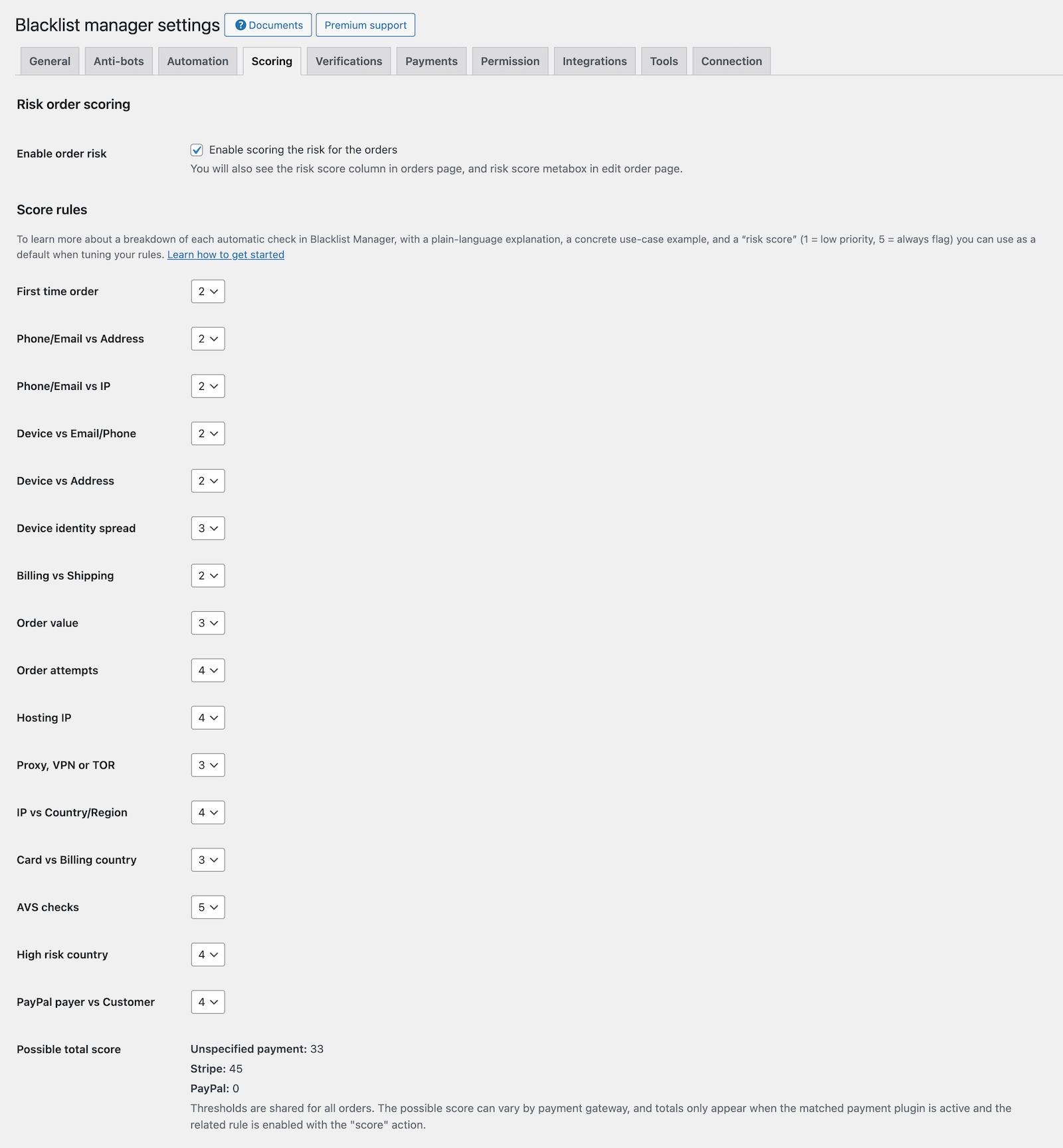
Score Rules
Each enabled score rule adds points when its condition is matched. For example, a proxy/VPN match may add points, a device mismatch may add points, and a high order value may add points.
The final score is stored on the order and shown in the Order risk score metabox.
Treat as Score
In Automation settings, Treat as score means the rule does not immediately email, suspect, or block the customer. Instead, it contributes to the order risk score.
This is the safest starting action for most rules because it lets several signals work together.
Gateway-Specific Totals
Blacklist Manager can calculate total possible score differently by payment family, such as Stripe, PayPal, Mollie, or unknown gateways. This matters because some payment methods provide more fraud data than others.
On the order page, the score box can show which payment method total was used.
Threshold Levels
Thresholds decide how the score should be interpreted.
| Threshold | Typical meaning | Recommended action |
|---|---|---|
| Level 1 | Low to moderate risk started. | Show as moderately risky. |
| Level 2 | The order deserves stronger review. | Optionally auto-add to Suspects. |
| Level 3 | The order is severe risk. | Optionally auto-add to Blocklist and cancel if configured. |
Auto-Add Suspects and Blocklist
If risk score auto-actions are enabled, reaching Level 2 can add the customer to Suspects, and reaching Level 3 can add the customer to Blocklist.
Use these auto-actions carefully. If you are still tuning rules, disable automatic suspect/block actions until the score is reliable.
Auto-Cancel Delay
When an action adds the customer to Blocklist, Premium can schedule an automatic order cancellation after a delay. The delay gives your team time to review before the order changes status.
Use a short delay only when fraud risk is high. Use a longer delay if staff review is part of your process.
Recommended First Scoring Setup
- Enable order risk scoring.
- Set most automation rules to Treat as score.
- Keep automatic suspect/block actions disabled at first.
- Review real orders for a few days.
- Adjust points and thresholds based on actual false positives.
- Enable Level 2 or Level 3 auto-actions only after you trust the score.

If blocked score actions should also block linked customer accounts, review Block and Unblock WordPress Users.
Continue from Blacklist Manager Premium documentation to the complete product workflow.
Evaluate product scope on the money page, use the pillar Guide for decisions and trade-offs, and return here for exact configuration.
Did this guide answer your question?
Still stuck?
Open a support request and include this article title, your plugin version, and what you already tried.
Open Support